Migration Preparation
Product Guide Library > PRM > Migration Preparation
Physician Strategy Suite vs. Ascend
Marketware’s Physician Strategy Suite was created to enhance capabilities for physician relationship management. Workflows have been streamlined, activities have been broadened, reporting is more robust, and profiles are easier to create and manage.
This core update to the application was created to make PRM and Analytics more cohesive, as well as work in line with our other product offerings of Recruitment & Onboarding for a suite of products to cultivate the relationship with a provider from start to retention.
New Features in the Physician Strategy Suite
- Dynamic Custom Fields: Instantly reportable from list grids
- Field Customization in Account Settings: Customize activities, issues, & initiatives
- Activity Commenting & Tagging: Robust internal collaboration with full history tracking
- Linked Activities: Manage dependencies by tying outcomes together
- Calendar Integration: Convert external items into in-app activities
- Custom Activity Types: Tailor your calendar to your workflows
- File Security Permissions: Grant file access to specific users
Enhancements to Existing Features
- Enhanced List Grids: Access more data with saved views & filters
- Bulk List Actions: Perform actions at scale & view deleted or out-of-area records
- Service Area Enhancements: Support more robust & meaningful reporting where zip codes can be part of more than 1 service area
- Cleaner Profiles: Easier access to the data you track
- Initiative Templates: Simplify repeatable efforts with reusable templates
- Easier Activity Tracking: Focused view of upcoming due items
- Streamlined Calendar Integration: Improved syncing with Microsoft & Google
- Upgraded Security Settings: Includes SSO, MFA, & password expiration controls
Sunsetted Features & Functionality Changes
Some features in Ascend have been replaced, relocated, or are on the roadmap. Here’s how those changes are addressed in Physician Strategy Suite:
- Alignments: Replaced by Marketware’s Onboarding module
- Recruiting: Replaced by Marketware’s Recruitment module
- Ascend PDF Reports: Replaced by enhanced dashboards & list grids
- Advanced List Creation: Application lists allow for easier report pulling without the need for a complex query builder
- Native Mobile App: Upgraded to a mobile-responsive design that no longer requires mobile users to install separate apps with limited functionality
- Custom Access Groups: Replaced by 5 defined user roles with simplified access rights
- Access Levels on Profiles & Activities: Role-based access instead of per-record adjustments
- Targeting Profiles: Achieved through list reporting, targeting can be done with saved views
Important Features on the Roadmap
- Mobile Responsiveness: In development, Q3 2025 (Allowing users to access everything within the app from a browser on a tablet or mobile device)
- Routing: In design, Q1 2026
- Blue Man Group/Associated Profiles: In design, TBD
- Recurring Activities: In design, TBD
- Advanced List Grid Search: In discovery, TBD
- Tagging on Profiles: In discovery, TBD
- Merging Profiles (Front-End): In discovery, TBD (Available as a backend function)
A granular breakdown of exact field mapping for people (contacts), places (facilities), activities, issues & initiatives can be found below.
Affiliations & Locations Update
To improve how places (facilities) and affiliations are managed in the Physician Strategy Suite, each place record now supports only one address. During migration, each location is treated as a separate place record.
- Affiliations now represent the provider’s practice locations
- A place record does not require an address
- Affiliations can exist without an address on file
In-Depth Look at Affiliation & Location Migration Logic →
Clean Up Considerations Before Migration
The below items will be migrated over, 1:1, allowing you the opportunity to review and clean up unwanted values:
- Affiliations on people (contacts) without a corresponding location (address)
- Activity type
- Activity topics (migrated as tags)
- Activity categories
- Additional Information Fields on people (contacts) & places (facilities) (migrated as custom fields)
- Issues category
- Issues source
- Initiative category
- Service areas in the new application allow zip codes to apply to more than 1 area; these will be migrated as is from Ascend to PSS, but use this opportunity to identify how to expand service areas for the new system
Some items won’t transfer during migration, providing an opportunity to review and refresh existing views you’d like moving forward:
- Dashboard saved views
- Saved Lists
Service areas will migrate as-is, but the new platform allows each zip code to belong to multiple areas. This is a great opportunity to review and expand your service area designations.
- Current service areas are a single zip code and are limited to one service area
- New platform allows a single zip code to be assigned to multiple service areas
User List Clean Up & User Role Mapping
User List Review & Clean Up
Review the system user list and identify users to migrate to the new system. PSS requires a first & last name to be migrated over; however, the legacy application doesn’t have this same check. Once the user list has been identified, work to update user profiles to include a First & Last name designation.
For smaller user lists, navigate to the user’s profile by searching for them in the global search. Edit the profile by clicking the name and inputting the first & last names as identified from the system settings.
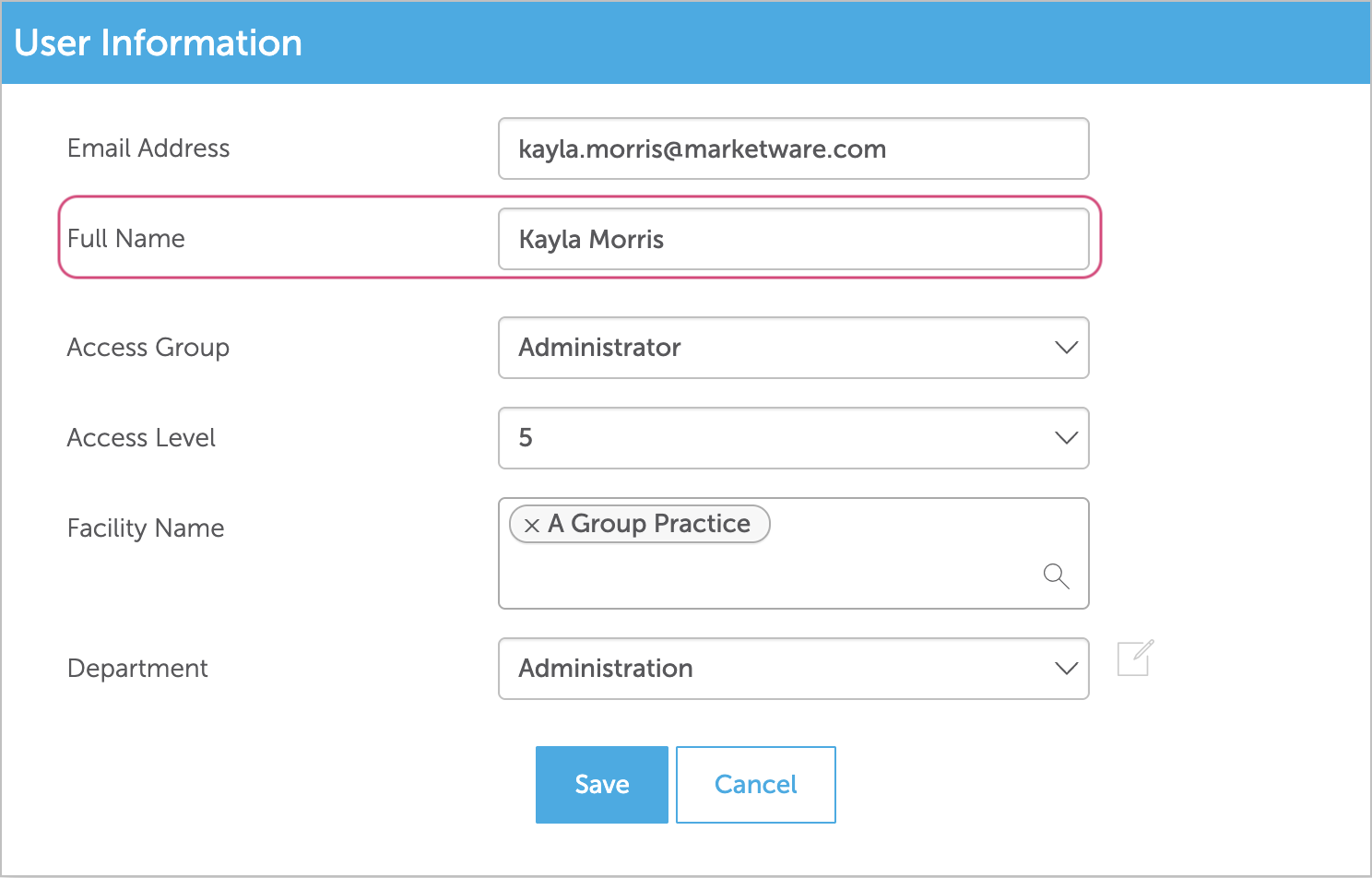
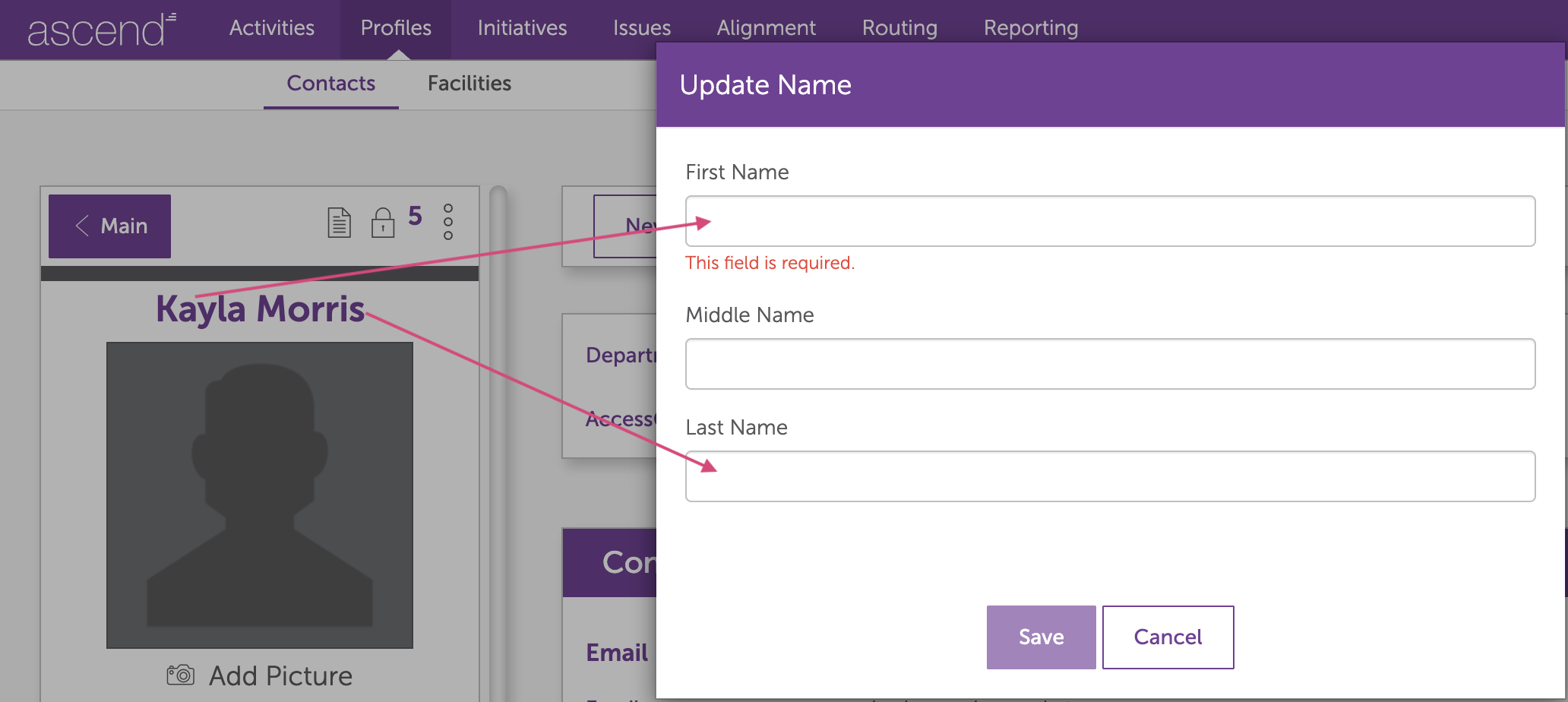
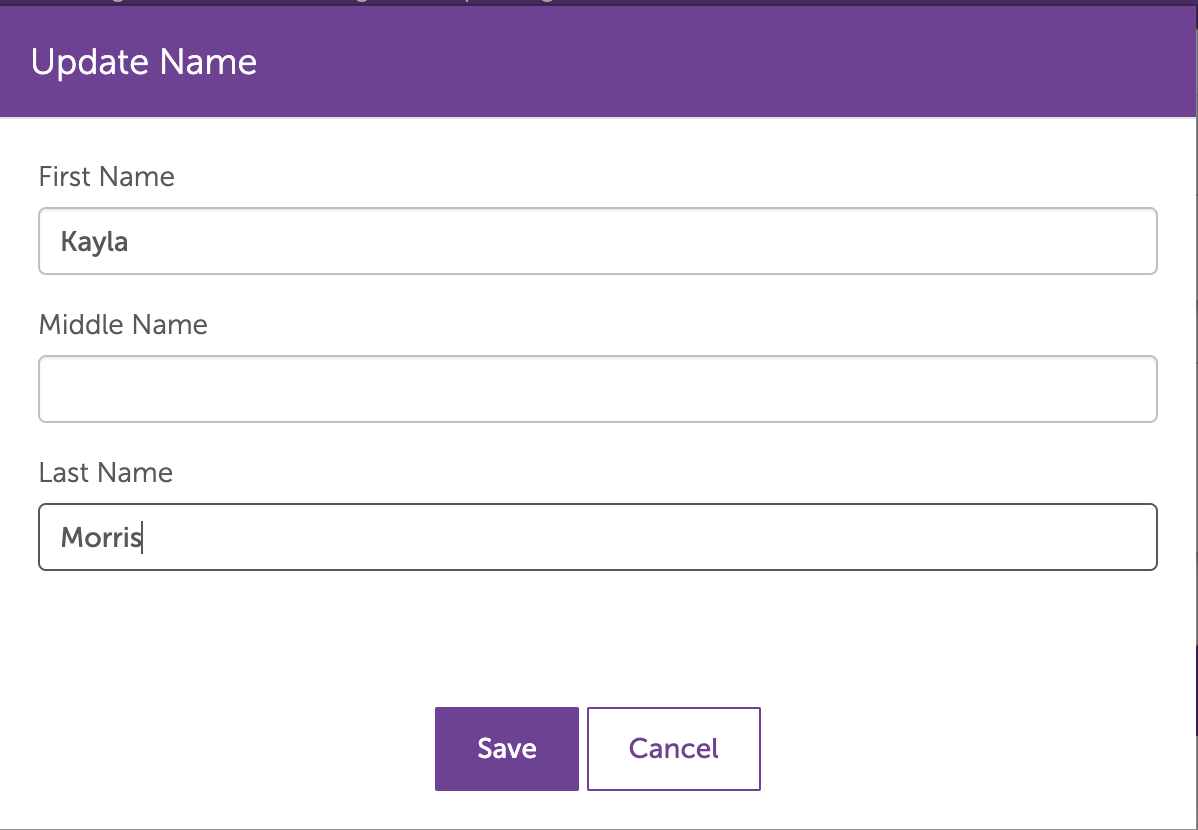
If your system user list is more than 20 users, this can be updated via a BI process. Work with your client success executive to identify the user list in a spreadsheet, including the headers: email, entity ID, first name, and last name. The entity ID can be found as the last numeric value in the URL or as the ID from the contacts list.

Warning!! Our internal system cannot validate that the data provided is mapped correctly. Please be sure the data is mapped accurately, as this process will update based on the values given. Example: ensure that Jane Doe is tied to janedoe@email.com. If anything is mismatched, it will be wiped and replaced.
User Role Mapping
Physician Strategy Suite uses five standardized roles: Admin, Full, Standard, Limited, and Read-Only.
Ascend comes with two base access groups — Administrator and Standard. If any custom access groups have been created, these will need to be mapped to fit one of the user roles available within Physician Strategy Suite, as we cannot create custom user roles (access groups). A full breakdown of the permissions can be found below.
Training Opportunities
Product Guide Library

