Physician Strategy Suite Affiliation Logic
Product Guide Library > PRM > PSS Affiliation Logic
Learn how affiliation data is migrated from Ascend into the Physician Strategy Suite.
Permissions & Restrictions
Term Definitions
Primary Affiliation: PSS uses the term primary as the indicator for a provider’s main practicing location. Only 1 location can be marked as primary for a provider.
Secondary Affiliation: Refers to a secondary location that a provider may practice or split time. Only 1 location can be marked as secondary for a provider.
Place: Facilities are referred to as place records and can be defined by an ambulatory surgery center (ASC), group practice, health system, hospital, post-acute care, and other.
Restrictions or Pre-Requisites
Place records can only have 1 address associated. Locations for facilities in Ascend will be split out as separate place records.
Key Affiliation & Location Differences: Ascend vs. Physician Strategy Suite
| Feature | — — — | Ascend | — — — | Physician Strategy Suite |
|---|---|---|---|---|
| Provider Profile | Can have multiple addresses (locations) | Has multiple contact addresses, & place records are tied as affiliations | ||
| Facility Profile | Can have multiple addresses (locations) | A place (facility) can only have 1 address |
Migration Logic Overview
Facility Migration (Facility & Address → Place)
The migration process will pull all facilities and their addresses and create a place record for each one.
- If a facility has no addresses, the migration will create a place record without an address
- If a facility has multiple addresses, the migration will create 1 place record per address
- If a provider address does not match any of their affiliations’ addresses (standalone address), the migration will create a place record using: City + Location + AddressLine1, e.g., ‘Salt Lake Location — 123 Main Street’
Affiliation Migration (Person → Place)
The migration will assign a person to a place with the process below. This logic reduces noise because a facility can have more than one address, so we want to affiliate the address of the provider that matches the address of the affiliation.
- Step 1 — Primary Affiliation Match: The process will look at the provider’s affiliations. If the provider’s main affiliation address matches the provider’s main address, this will be set as the primary affiliation in Physician Strategy Suite.
- Step 2 — Fallback to Affiliation Match: If a provider’s address isn’t marked as main, but matches their main affiliation address, this will be set as the primary affiliation in Physician Strategy Suite.
- Step 3 — Standalone Address: If the provider’s addresses do not match any of the affiliations’ addresses (standalone address), then the process will affiliate only the addresses to the provider and set the main standalone address as primary in the Physician Strategy Suite. If there is no address marked as main in Ascend, the process will not mark any as primary in Physician Strategy Suite.
- Step 4 — No Address Match: If the provider’s affiliations’ addresses do not match the provider’s addresses, no affiliation will be applieds
Migration Mapping Examples
Example 1: John Doe
Main Affiliation & Main Location Match
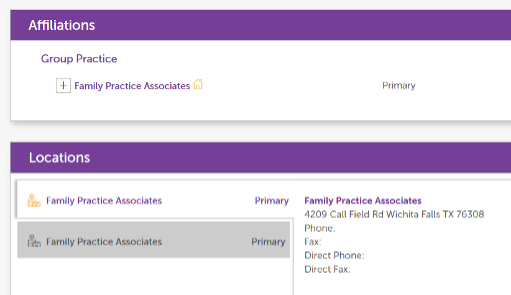
Ascend →
Profile has a main affiliation, ‘Family Practice Associates’, and a main address. The address in John’s profile matches an address in the ‘Family Practice Associates’ profile.
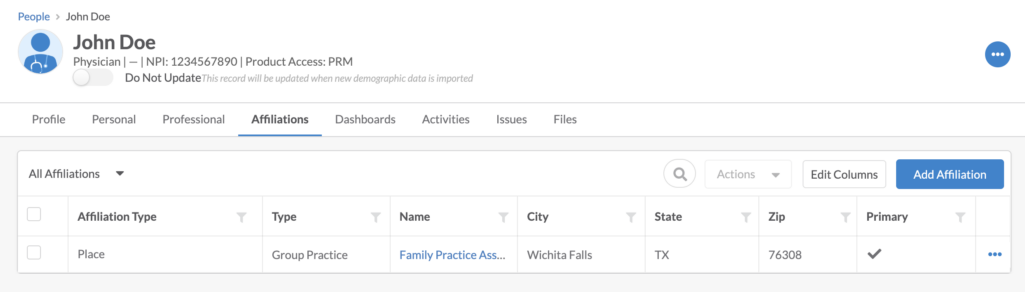
Physician Strategy Suite ↓
Family Practice Associates will be created as a place record, affiliated with John Doe’s profile and marked as primary.
Example 2: Jane Doe
1 Main Affiliation & 2 Locations, 1 Marked as Main
Ascend →
Profile has one main affiliation, ‘Family Practice Associates’, and two locations. The main address matches an address in the ‘Family Practice Associates’ profile.
Physician Strategy Suite ↓
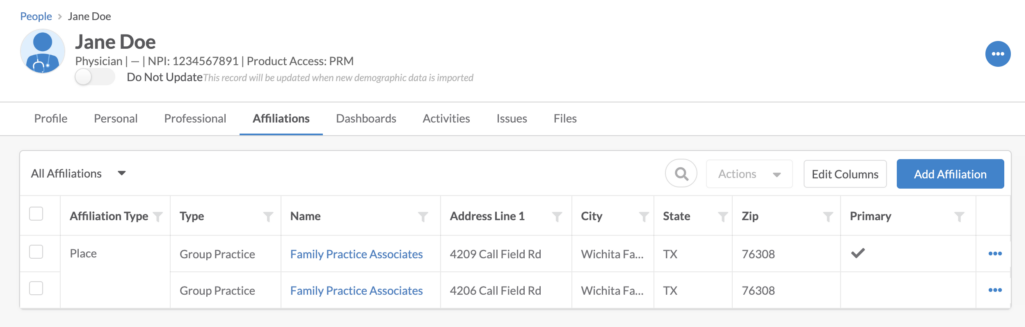
Both locations will be created as place profiles with the name Family Practice Associates. Both places will be affiliated with Jane Doe’s profile, and the location that is marked as main in Ascend (the one with the address 429 Call Field Rd) will be marked as primary in PSS.
Example 3: Steven Doe
2 Affiliations & 2 Locations — Both Match 1 Affiliation
Ascend →
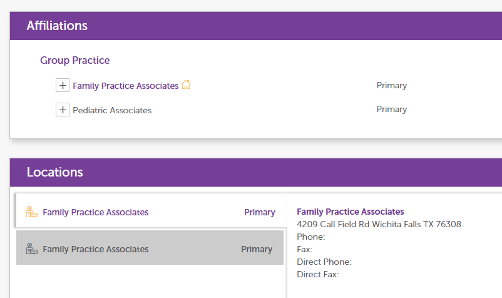
Profile has two affiliations, Family Practice Associates and Pediatric Associates. The Family Practice Associates is set to main. In the locations section, Family Practice Associates has two addresses. There are no addresses matching the Pediatric Associates profile.
Physician Strategy Suite ↓
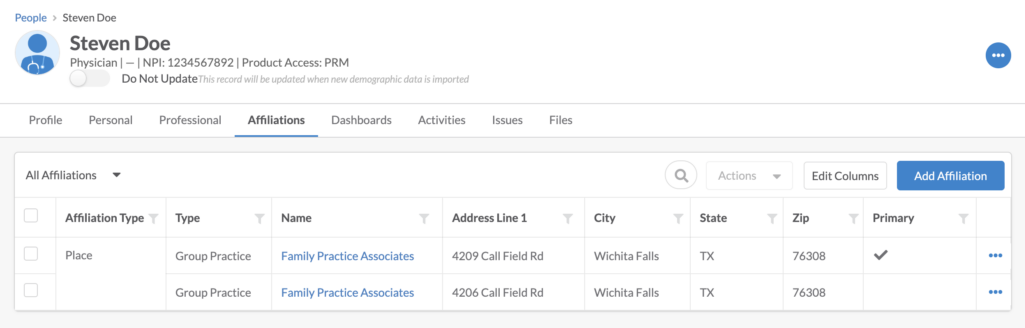
The two locations will be added as place records and affiliated with Steven Doe. Both are named Family Practice Associates, and the place that is marked as main in Ascend (with the address 429 Call Field Rd) will be marked as Primary in PSS. The Pediatric Associates affiliation will be added as 1 or more place record(s) (depending on how many locations are tied to the facility’s profile), but because there were no matching locations tied to Steven Doe, Pediatric Associates will not be affiliated on the profile.
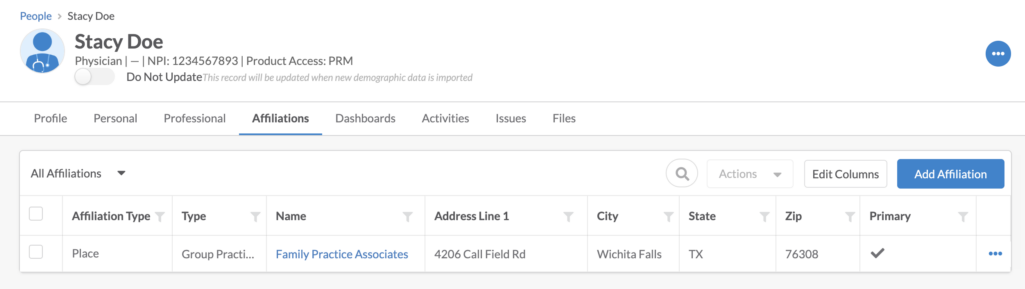
Example 4: Stacy Doe
1 Affiliation, Marked Main & 1 Location, Not Marked Main
Ascend →
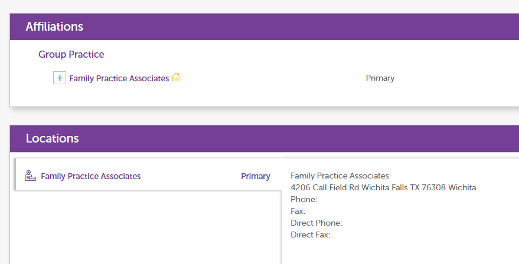
Profile has one affiliation, Family Practice Associates, that is set to main, and one address. This address is also an address under the Family Practice Associates’ profile, but this address is not marked as the main.
Physician Strategy Suite ↓
From the above scenario for Steven Doe, Family Practice Associates was created as a place with the location address. The 4206 Call Field Rd place will be affiliated with Stacy Doe and although the location in Ascend was not marked as main, the address matches an address in the main affiliation Family Practice Associates profile; therefore, in PSS, the place Family Practice Associates with address 4206 Call Field Rd will be marked as primary.
Example 5: Kevin Doe
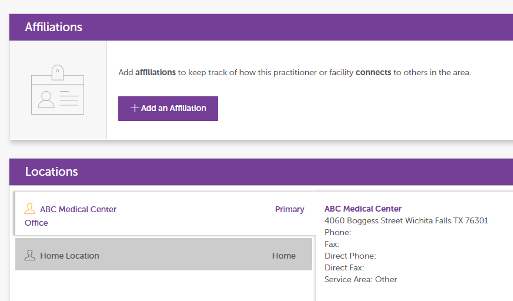
No Affiliations & 2 Locations — 1 Named, Marked Main & 1 Unnamed
Ascend →
No affiliations in the profile, but there are two addresses. One with a location name, ABC Medical Center, and one without a location name. The location with a name is marked as main.
Physician Strategy Suite ↓
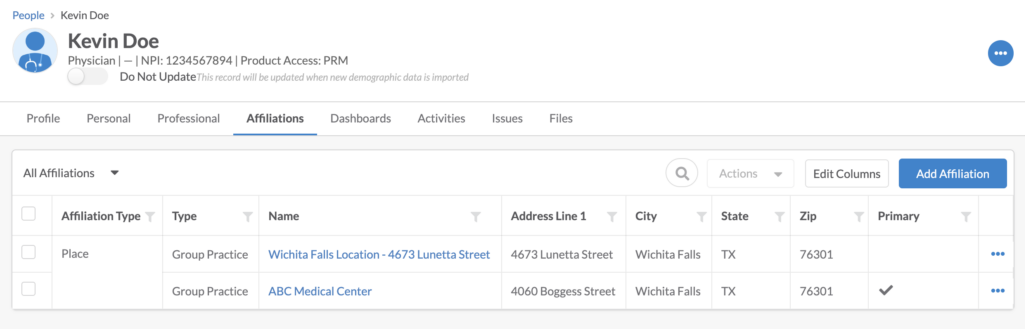
The two locations will be created as places and will be affiliated with Kevin Doe. The location without a name, 4673 Lunetta Street, will be migrated over without a place name, but instead will be named Wichita Fall Location — 4673 Lunetta Street. The ABC Medical Center place is set to primary matching with Ascend.
Example 6: Kelly Doe
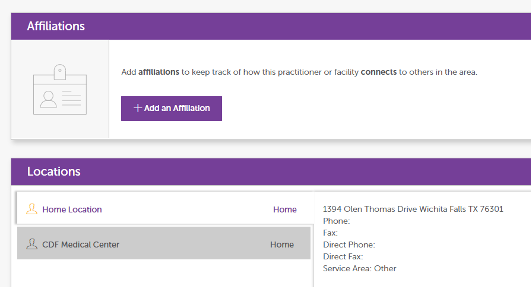
No Affiliations & 2 locations — 1 Named & 1 Unnamed, Marked Main
Ascend →
Similar to the above scenario, there are no affiliations on the profile. There are two locations, one with the name CDF Medical Center and one without a name. The one without the location name is set to main.
Physician Strategy Suite ↓
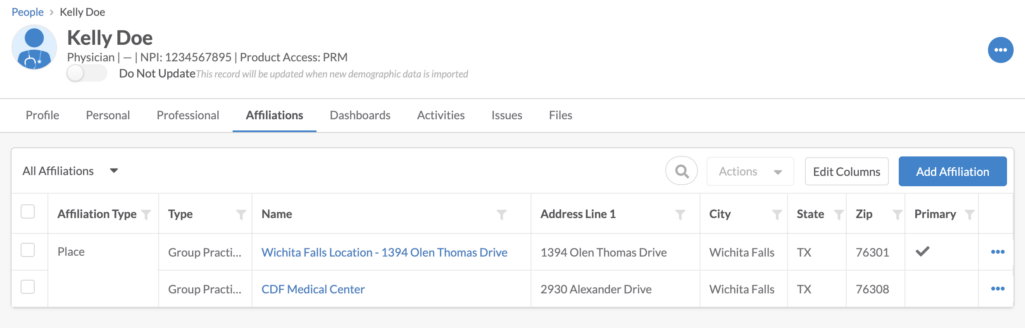
Two places will be created and will be affiliated with Kelly Doe. One place is named CDF Medical Center, and the other is named Wichita Fall Location — 1394 Olen Thomas Drive. Because Wichita Fall Location — 1394 Olen Thomas Drive did not have a location name, nor does its address match any affiliation address (this profile does not have any affiliations), it migrated over without a real place name and is set to primary matching what is in Ascend.
Example 7: David Doe
1+ Affiliations & No Locations
Ascend →
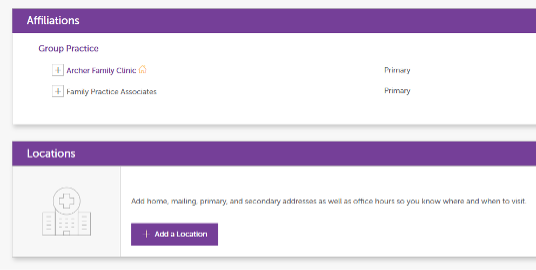
Profile has two affiliations but no addresses. Archer Family Clinic is set to main.
Physician Strategy Suite ↓
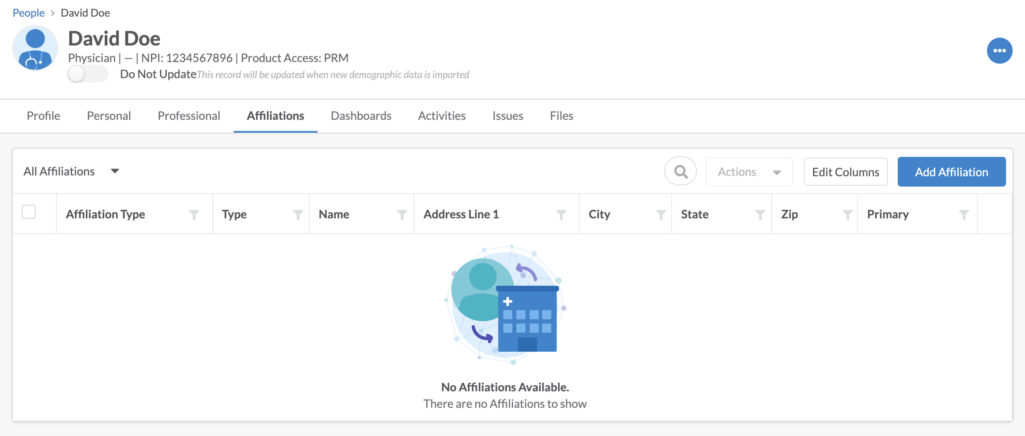
Because there are no locations tied to David Doe, the affiliations will not be migrated over in PSS for David Doe. This is due to the profile not having locations per the migration logic, ‘If the provider’s affiliations do not have any addresses that match the provider’s addresses, then the affiliation (Facility) will not be affiliated to the provider (Person).’ Since this profile has no locations, nothing was affiliated in PSS.
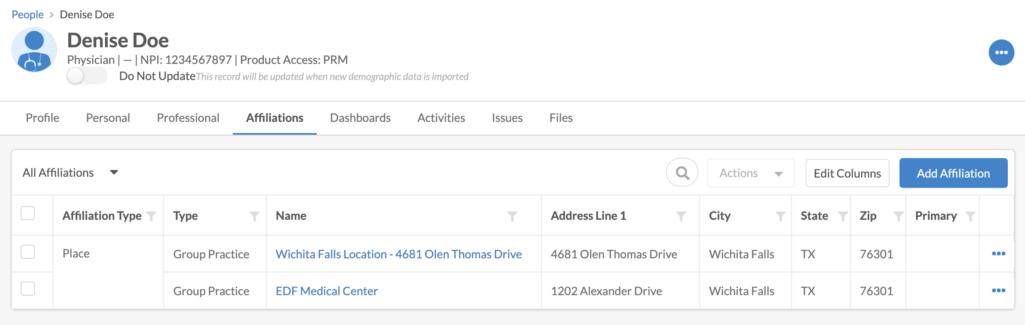
Example 8: Denise Doe
No Affiliations & 1+ Locations, Not Marked Main
Ascend →
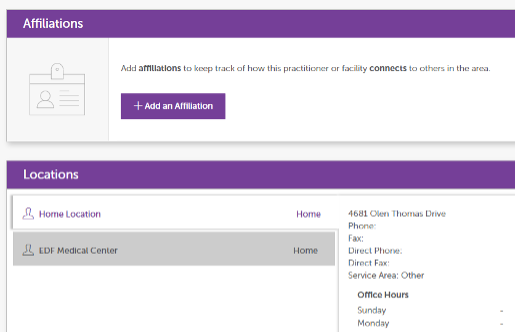
Profile has no affiliations and two locations. Neither of the locations are marked as main.
Physician Strategy Suite ↓
Both locations are created as place records and are affiliated with Denise Doe; however, neither is marked as primary, as neither locations are marked as main, and there are no affiliations to cross-check in Ascend.
Example 9: Hank Doe
1 Affiliation & 1 Location — Location Unnamed but Matches Affiliation Location
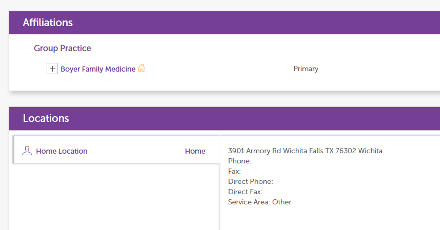
Ascend →
Profile has one affiliation, Boyer Family Medicine (set to main), and one location without a name (not main). The profile’s location does match the address in the Boyer Family Medicine’s profile.
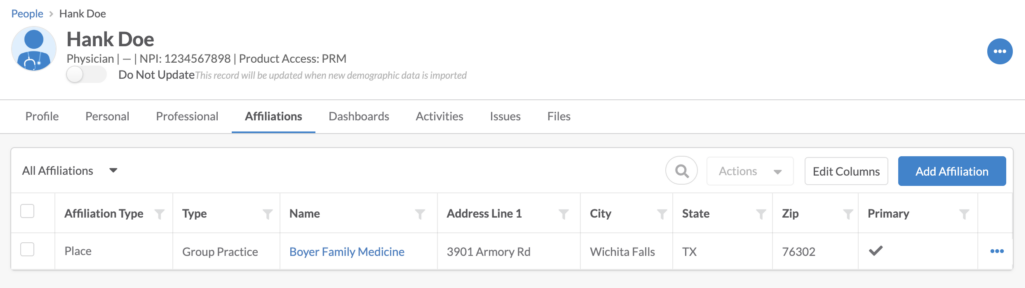
Physician Strategy Suite ↓
While the location does not have a name, because it matches a location in the Boyer Family Medicine profile, it will be created as a place called Boyer Family Medicine. Because the affiliation was marked as main in Ascend, this place will be marked as primary in PSS.
Example 10: Helen Doe
Mismatched Main Affiliation & Main Location
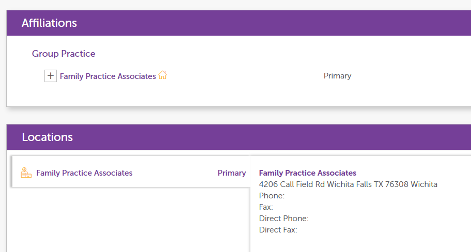
Ascend →
Profile has two affiliations, Family Practice Associates and Pediatric Associates. Family Practice Associates is set as the main affiliation; however, the main location, 4420 Kimbell Dr, matches the address in the Pediatric Associates profile. The main affiliation’s address and the main location address do not match.
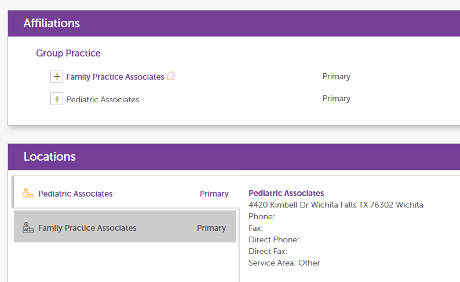
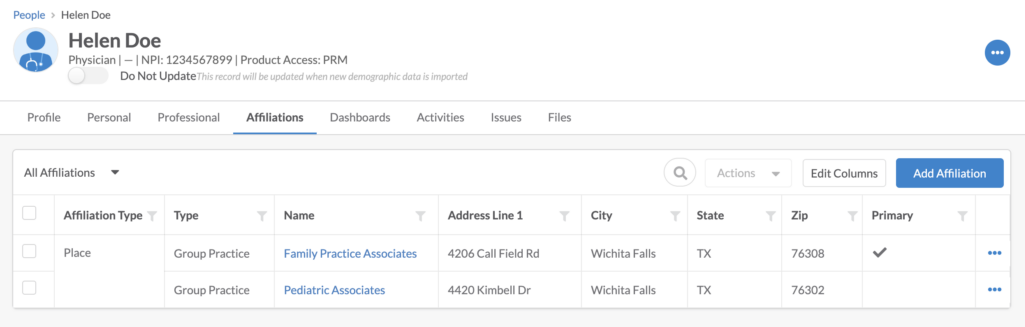
Physician Strategy Suite ↓
Both locations will be brought over as place records. Because there is a conflict with main between affiliation and location, the main affiliation will take higher priority. If there is an address that matches the main affiliation (Family Practice Associates), it will be set to Primary. Since the process found a matching address as the main affiliations’, it set Family Practice Associates with the address 4206 Call Field Rd as the primary affiliation.