Merge Profiles
Product Guide Library > Physician Strategy Suite > Merge Profiles
Permissions & Restrictions
Permissions
Admins: Can merge profiles.
All other users: Merge is restricted to administrators only.
Term Definitions
Profile 1: The profile being merged.
Profile 2: The profile being merged into.
Restrictions or Pre-Requisites
At this time, merging is only available for people profiles.
Users can only merge profiles for which they have the same product access. Example: if I am a recruit only admin I cannot merge an onboard and recruit profile unless I have onboard access too.
See people profile guide for product access information
Overview
Merge profiles allows admin users to merge two profiles to retain details from both profiles. This is only available to administrators and profiles that have the same product access.
Note* Merging profiles together is a permanent action – once this is done, it cannot be undone.
Logic
Profile 1 is the profile that will be merged into another profile.
Profile 2 is the profile that will be merged into.
When possible, details are additive, while in instances where there can only be a singular value, the profile being merged into takes priority.
- When fields are missing values from one profile to another, then those field values will be inserted into the merged profile. Example: Profile 1 has a middle name & a specialty defined. Profile 2 that is becoming the merged profile does not have a middle name or specialty. The middle name and specialty from profile 1 will be inserted into profile 2.
- When fields can only accommodate singular values, and both profiles have this filled out, profile 2 will take precedence. Example: Profile 1 & Profile 2 both have NPIs but they differ. Profile 2s NPI will persist.
- Fields that can accommodate more than one value will keep information from both profiles. Example: Profile 1 has a work number saved to contacts while Profile 2 has a mobile number saved and this is marked as preferred. The work number from Profile 1 will be added to the contacts section of Profile 2 and the mobile number that was already marked as preferred will persist.
- Any processes that Profile 1 is part of will merge over and Profile 2 will be added to those processes – these include Initiatives (PRM), Practice Opportunities (Recruit) & Onboard Projects (Onboard).
- All activities, Issues & Files will be merged over from Profile 1 to Profile 2.
- Affiliations Primary Logic:
- If Profile 1 has a primary affiliation listed and Profile 2 does not – the affiliations merged into Profile 2 will take Profile 1’s primary designation.
- If Profile 1 & Profile 2 have the same primary affiliation listed, the primary affiliation will remain the same.
- If profile 1 & Profile 2 have differing primary affiliations listed, Profile 2’s primary affiliation will persist as the primary affiliation while the other primary affiliation from Profile 1 will be merged over and not marked as anything.
Merge People
Merge works from within a profile page. The profile whose page is open will be merged into the searched on and chosen profile.
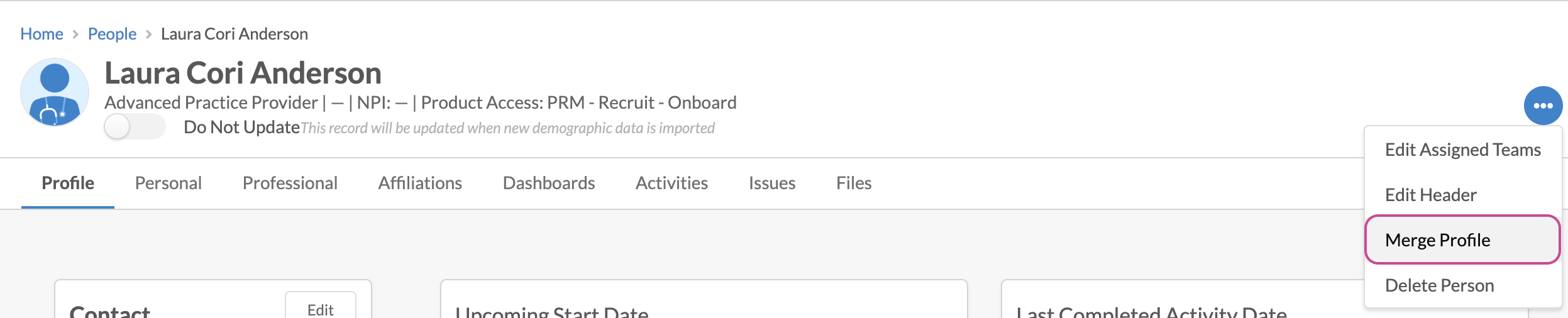
From the profile to be merged, click the ellipses icon in the header; click Merge Profile.
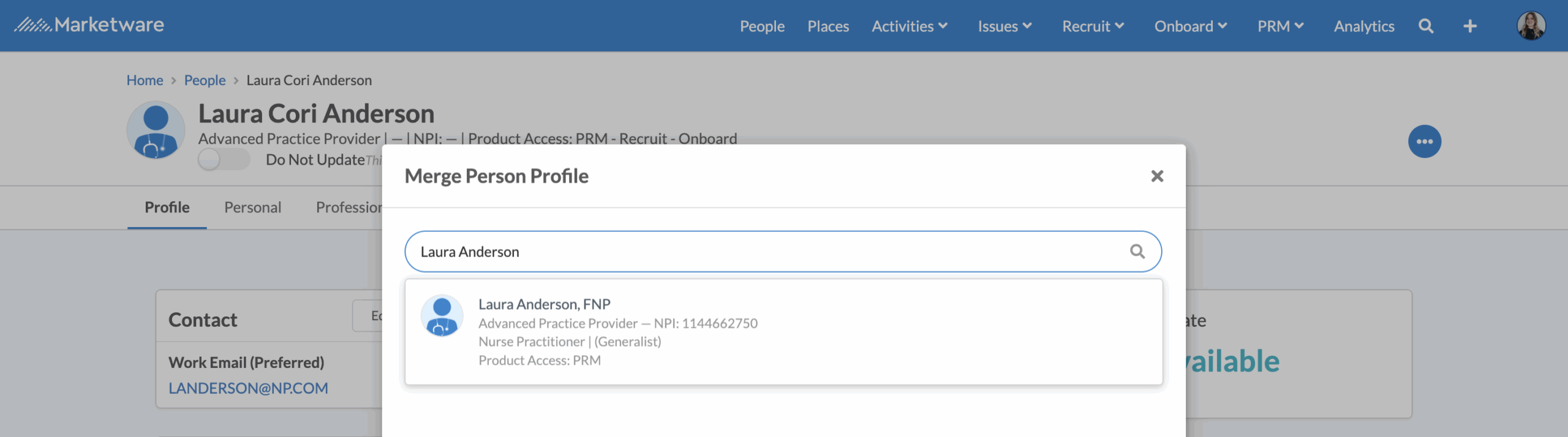
Clicking the merge option will open a search to find and select the profile to merge into. Searching can be made on name, NPI & email. On typing, the top, relevant matches based on your key search will show in a scroll dropdown.
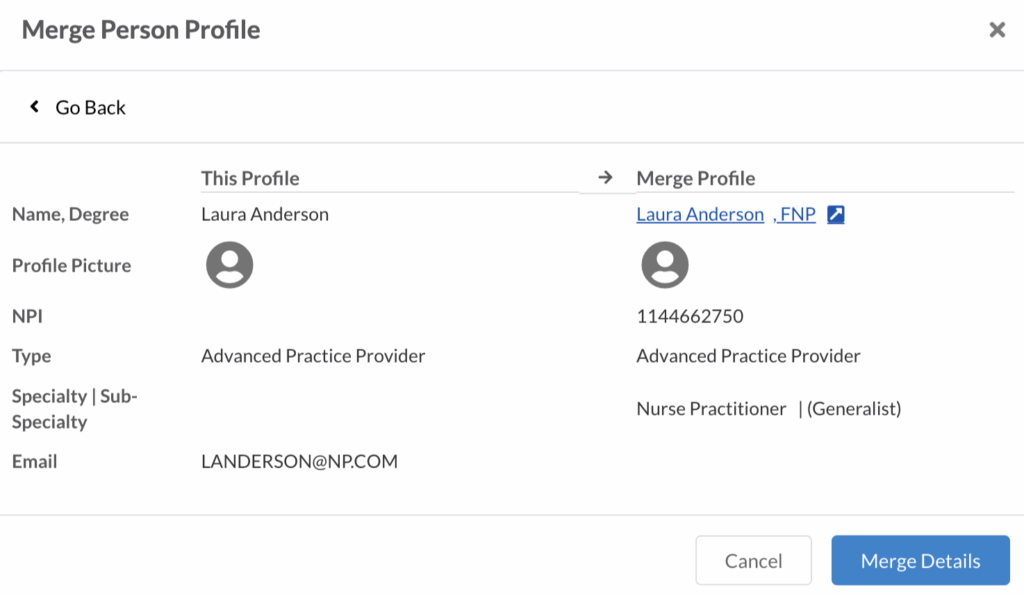
Selecting the profile will open a comparison modal to ensure the profiles to merge are the correct profiles. This will compare profile name & degree, profile pictures, NPI, profile type, specialty & sub-specialty, and email. The profile that will be merged into is hyperlinked to the full profile page so it will open in a new tab to do a further review.
Users can close or cancel the merge by clicking the x icon or the cancel button. If the profile selected is not the desired profile, click the Go Back button to go back to the search window.
Clicking the Merge Details button will ask for a confirmation that the profiles should be merged and once confirmed, the profiles will be merged together. A success message will display and the profile page will refresh to the updated merged profile.


Product Guide Library
Physician Strategy Suite Related Resources

